AI 会议总结工具
现场录音,或上传 Zoom、Teams、Meet 的会议录音。拿到决策、带负责人和截止日期的待办事项,以及还没解决的问题。
看看一场真实会议能得到什么
会议内容全掌握,不用再听一遍
AI 会议总结工具把整段录音从头过一遍,你只看有什么变化。
3 份清单 每场会议都提炼出决策、待办事项和待解决问题
每场会议都提炼出决策、待办事项和待解决问题
0 个机器人 不会有任何东西加入通话;你自己录音,或开完会上传
不会有任何东西加入通话;你自己录音,或开完会上传
每天 3 场 免费总结,每场最长 30 分钟,无需信用卡
免费总结,每场最长 30 分钟,无需信用卡
看一份真实的会议总结
四场示例会议,和你的会议一样经过 AI 会议总结工具处理。选一场,左右对照看文字稿和总结。
0:00Okay, I think that's everyone. Kenji, I think you're on mute. No, there you go.
0:07Sorry, sorry. My dog has decided the delivery guy is a threat. He's fine now. Mostly.
0:14Ha, no worries. Before we start, did anyone else get the email about the office coffee machine? Apparently the new one needs an app to make an espresso.
0:27Of course it does. I'm bringing my own kettle. Okay, sorry, go ahead, Priya.
0:34Okay, so quick agenda. Release 3.4 status, the Northgate bank sync latency, and Aisha has the onboarding test results. Kenji, let's start with you. Where are the beta numbers?
0:47Yeah, so the beta is at 412 users now. Crash-free rate is 99.2, sorry, 99.1 as of this morning. Our bar for shipping is 99.5, so we're under it.
1:02And almost all of that is one crash. It's the CSV export on older phones, anything still on OS version 10. If you export more than a few hundred transactions, the app just dies.
文字稿的第一分钟。时间为录音开始后的 分:秒。
Team Sync: Release 3.4, Bank Sync, and Onboarding Redesign
The team met to review the status of release 3.4, addressing critical crash issues with the CSV export feature, Northgate bank sync latency, and onboarding usability test results. Due to a crash affecting older devices on CSV export, the team decided to remove the feature from release 3.4 and defer it to 3.5, shifting the release date to Thursday the 12th to allow for a full regression pass. Additionally, they evaluated onboarding flows and decided to adopt the shorter three-screen option B. The meeting concluded with clear task assignments for feature flagging, regression testing, specs delivery, and release communications, while leaving the Northgate API latency cause and shared budget pricing open.
提到的人名:KenjiPriyaMarcoAisha
决策3
- Remove CSV export from 3.4 and move it to 3.5 — The crash is in that code path, only about 3% of users touch it, and the fix is too risky for this week.2:51
- Move 3.4 release from Tuesday the 10th to Thursday the 12th — We need a full regression pass after the flag change and we're not shipping under 99.5 crash-free.3:58
- Go with option B for onboarding — Five out of six finished versus three out of six, and it's less engineering work.6:44
待办事项4
- 3:08
Put export behind a feature flag and flag it off by Friday
Marco截止:Friday - 3:47
Complete full regression testing by Wednesday end of day
Kenji截止:Wednesday end of day - 4:13
Update release notes and inform support about the new date
未指定负责人截止:end of day today - 6:56
Finish option B specs in Figma and hand them off
Aisha截止:Monday
待解决问题2
- Is the Northgate bank sync latency caused by API rate limiting or our retry logic?5:27
- Will shared budgets be free or Plus only?7:11
会议均为虚构。总结与 AI 会议总结工具的输出完全一致,未做任何修改。示例会议是英文的;你自己的会议用什么语言开,总结就用什么语言写。
4 步总结一场会议
从录音到可分享的笔记,几分钟搞定。不用设置,不用授权日历,不用装应用。
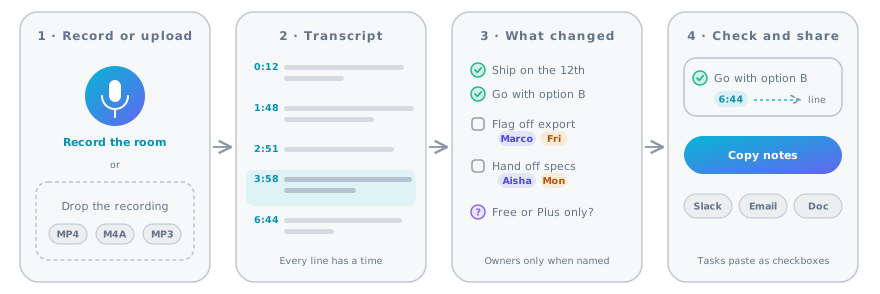
1.录音或上传
线下会议直接点录音,或者拖入会议软件保存的文件:MP3、M4A、WAV、MP4、MOV 或 WEBM。
提示
把手机或电脑放在桌子中间。离得越近,越清楚。
2.拿到文字稿
录音会变成带时间戳的文字稿,语言和会议所用的语言一致。
提示
30 分钟以内的会议免费。付费套餐最长 3.5 小时。
3.拿到决策和任务
AI 会议总结工具先写一段简要回顾,再列出决策、带负责人和截止日期的待办事项,以及待解决问题。
提示
负责人和日期只取自会上说过的话。没人认领的任务,会直接标明。
4.核对并分享
点一个时间,就能看到文字稿里对应的那句话。然后把笔记复制到 Slack、邮件或团队文档里。
提示
复制出去的待办事项是复选框格式,可以直接放进任务清单。
AI 会议总结工具会提炼什么
文字稿告诉你说过的每句话,会议总结告诉你什么变了。每份总结分四部分,按大家需要的顺序排列。
简要回顾
一段话说清会议讲了什么、最后落在哪里,给没参会的人看。
决策,附上理由
只列大家达成一致的事,不列提过又放弃的想法。
带负责人的待办事项
每项任务都写明谁接下、对方说的截止时间,比如“Priya,周五前”。
待解决问题
暂时搁置的问题也记下来,下次开会前不会丢。
没有机器人进入你的会议
很多会议工具会派一个机器人进通话,还得有人放它进来。这款 AI 会议总结工具直接处理录音,什么都不用进会,也不需要日历权限。
现场录音
适合线下会议、访谈和开着免提的电话。录音在你的浏览器里进行。
上传软件保存的录音
Zoom、Microsoft Teams 和 Google Meet 都会保存录音,下载后拖进来就行。
粘贴文字稿
已经有文字了?直接粘贴,或上传 TXT、DOCX,总结会以智能笔记打开。
从 Zoom、Teams 或 Meet 拿到录音
各个软件把录音存在哪里,以及该上传哪个文件。
| 在哪开的会 | 录音在哪里 | 上传什么 |
|---|---|---|
| Zoom | 本地录制:“文档”里的 Zoom 文件夹。云录制:Zoom 网页门户的录制页面。 | M4A 音频文件(更小)或 MP4 |
| Microsoft Teams | 会议聊天里,保存在 OneDrive 或 SharePoint | 下载 MP4 |
| Google Meet | 组织者的 Google Drive,Meet Recordings 文件夹 | 下载 MP4 |
| 手机或语音备忘录 | 录音机或“语音备忘录”App | M4A、MP3 或 WAV 文件 |
| 会议室现场 | 还没录 | 点本页的录音按钮 |
最适合总结的会议
凡是要拍板、要分工的会议都行。下面这些,是大家最常交给 AI 会议总结工具的。
团队例会和站会
谁卡住了、什么有进展、本周到期什么,不用专人记录。
销售和客户电话
客户的需求、你承诺的下一步,以及承诺的日期。
项目启动会
范围、负责人和最初的截止日期,趁大家意见一致时记下来。
回顾会和事后复盘
哪里出了问题、要改什么、谁来跟进。
访谈和调研电话
要紧的回答都带时间,方便找到原话。
培训和入职
总结之外,还有记忆卡和小测验,检验记住了多少。
会议总结、会议纪要还是文字稿?
记录会议的三种方式,适合三类读者。
| 会议总结 | 正式纪要 | 完整文字稿 | |
|---|---|---|---|
| 篇幅 | 半页 | 1–3 页 | 一字不落 |
| 适合 | 没参会的同事 | 董事会和委员会 | 核对原话 |
| 决策和任务 | 开头就列出 | 正式记录 | 埋在正文里 |
| 阅读时间 | 2 分钟 | 10 分钟 | 和会议一样长 |
| 本页提供 | 有 | 可从总结起草 | 有,带时间戳 |
拿到总结之后
用 AI 会议总结工具处理过的每场会议都会存进历史记录,还有几种用法。
分享笔记
一键复制回顾、决策和任务,贴到团队常用的地方。
复习培训内容
打开由同一场会议生成的记忆卡和测验。
听一段回顾
把总结粘贴进 AI 播客生成器,生成一段简短的音频回顾。
隐私与知情同意
会议里有很多不该外传的内容。下面是 AI 会议总结工具处理录音的方式。
各套餐的会议时长和文件大小
AI 会议总结工具在所有套餐中都免费。付费套餐支持更长的会议,且没有每日次数限制。
| 套餐 | 最长会议 | 最大文件 | 每天会议数 |
|---|---|---|---|
| Free | 30 分钟 | 100 MB | 3 |
| Starter | 60 分钟 | 300 MB | 不限 |
| Basic | 2 小时 | 300 MB | 不限 |
| Pro、Team、Enterprise | 3.5 小时 | 500 MB | 不限 |
AI 会议总结工具常见问题
上传会议前大家常问的问题,简短回答。