
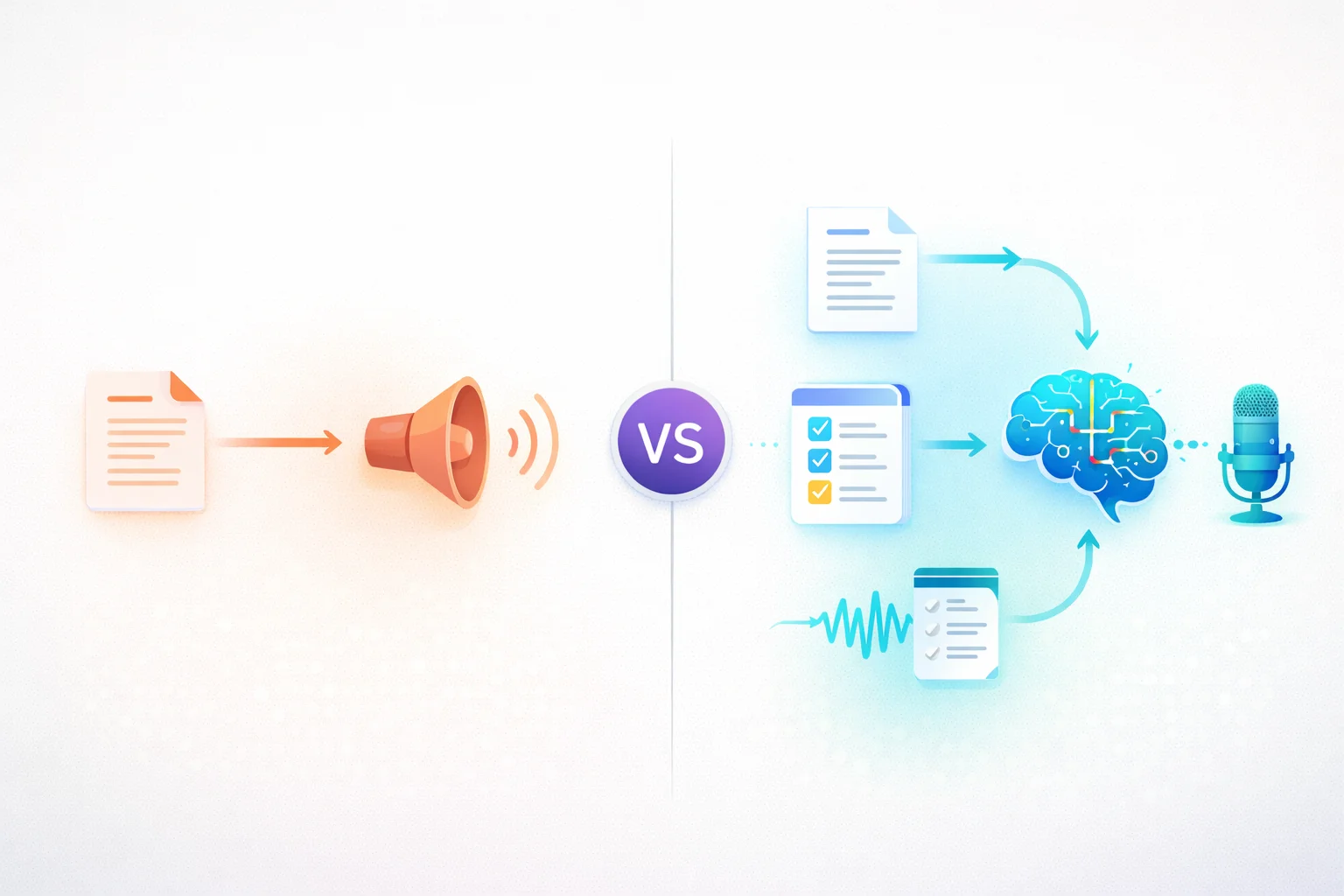
TurboCast and Speechify both turn written content into audio you can listen to on the go. But once you dig into how each tool actually works, you'll find they're solving very different problems. One reads your content. The other understands it and explains it back to you.
This comparison breaks down exactly how each tool works, what they're best for, and how to decide which one fits your workflow.
Quick Overview
🔊 Speechify — Premium text-to-speech reader. Reads your text word-for-word with high-quality AI voices. ~$139/year. Focused on accessibility and faithful reproduction.
🧠 TurboCast — AI podcast generator. Analyzes your content, generates a new explanatory script, and produces podcast-style audio. Free tier available + paid plans from $15/month.
The distinction matters: one is a reader, the other is a generator.
How They Actually Work
This is the most important difference — it shapes everything else about both products.
How Speechify Works
Speechify takes your input text and passes it through a TTS engine. The output is a faithful audio reproduction — every word, every sentence, in the same order. Voice quality is excellent, but the content itself is unchanged. If the original document is dense, technical, or poorly structured, the audio will be too.
How TurboCast Works
TurboCast works like an intelligent producer. Upload a PDF, paste a URL, or drop in a text document — the AI reads and comprehends the material before writing a new script. That script is structured as a podcast episode: context, key ideas in plain language, analogies, important points, and a summary. The result sounds like a podcast someone made about your document.
| Step | Speechify | TurboCast |
|---|---|---|
| 1. Input | Text, PDF, URL, ebook | Text, PDF, URL, audio, video |
| 2. Processing | TTS engine reads text | AI comprehends & rewrites |
| 3. Output | Word-for-word audio | New podcast-style explanation |
| 4. Result | Audiobook of your document | Podcast episode about your document |
💡 For a detailed look at how TurboCast handles documents, see the PDF to Podcast guide.
Side-by-Side Comparison
| Feature | Speechify | TurboCast |
|---|---|---|
| How it works | 🔊 TTS reads word-for-word | 🧠 AI generates new script |
| Output type | Audiobook of your document | Podcast episode about your document |
| Voice quality | ⭐⭐⭐⭐⭐ Excellent | ⭐⭐⭐⭐ High-quality |
| Languages | 20+ | 30+ |
| Voice options | Multiple AI voices | Multiple voices + style selection |
| Speed control | ✅ | ✅ |
| Style customization | ❌ | ✅ Podcast, Teacher, Summary, Storyteller |
| Length control | ❌ (full document) | ✅ 3 / 5 / 10 min |
| Script editing | ❌ | ✅ |
| MP3 download | Limited | ✅ Always |
| RSS / Podcast feed | ❌ | ✅ Private podcast feed |
| Shareable links | ❌ | ✅ |
| Smart Notes | ❌ | ✅ Free summaries & key points |
| Free tier | Basic voices only | ✅ 3 conversions/day |
| Pricing | ~$139/year | $15–$99/month |
| Best for | 🔊 Accessibility & reading | 🎓 Studying & research |
Key Differences in Detail
Output: Audiobook vs. Podcast
Use Speechify on a 50-page research paper and you get 50 pages of audio — every footnote, citation, and transitional phrase. Accurate, but a lot to get through.
Use TurboCast on the same paper and you get a 5–10 minute podcast that covers the research question, methodology, key findings, and why it matters. The density is compressed into something listenable.
🎯 Key takeaway: Need every word? Speechify. Need to understand the ideas quickly? TurboCast.
Customization and Control
Speechify gives you speed control and voice selection — appropriate for a TTS reader.
TurboCast offers a deeper layer because it's generating new content:
| Setting | Options |
|---|---|
| 🎙️ Style | Podcast, Teacher, Summary, Storyteller |
| ⏱️ Length | 3 min, 5 min, or 10 min |
| 🌍 Language | 30+ languages (cross-language conversion) |
| 🗣️ Voice | Multiple AI voices |
| ✏️ Script | Review and edit before audio production |
🎯 Key takeaway: TurboCast doesn't just translate — it re-explains content in your target language naturally, far more useful than a direct translation read aloud.
Accessibility vs. Learning
Speechify built its reputation on accessibility. For people with dyslexia, visual impairments, or reading difficulties, having text read aloud verbatim is genuinely valuable. It also integrates with browsers and apps for on-demand reading.
TurboCast is built around learning. The assumption is that you want to understand the content, not just hear it. This makes it ideal for students, researchers, and professionals who need to process information efficiently.
🎯 Key takeaway: Speechify makes text accessible. TurboCast makes complex ideas understandable.
Portability of Your Audio
Speechify's audio lives primarily in the Speechify app. Streaming within the app, with limited download options depending on your plan.
TurboCast generates MP3 files you own and take anywhere. Every conversion also gets a shareable link, and paid plans include a private RSS feed for Apple Podcasts, Spotify, or any podcast app.
🎯 Key takeaway: Speechify keeps audio in its app. TurboCast gives you files and a real podcast feed.
Pricing Comparison
| Plan | Speechify | TurboCast |
|---|---|---|
| Free | Basic voices, limited features | ✅ 3 conversions/day |
| Entry | $15/month (300 min) | |
| Mid | — | $29/month (600 min) |
| Pro | — | $59/month (1,200 min) |
| Team | — | $79/month (1,800 min) |
| Annual discount | Included in annual pricing | 20% off |
Included free for all TurboCast paid users:
- ✅ Unlimited audio extraction
- ✅ Unlimited transcription (Smart Notes)
- ✅ Private RSS feed
- ✅ Batch upload and export
AI podcast generation uses credits at 1 credit per minute. See full pricing details.

When to Choose Speechify
You Want Word-for-Word Reading
If you need to hear documents, ebooks, or articles read exactly as written — every word, every nuance — Speechify delivers a faithful audio reproduction with excellent voice quality.
Accessibility Is Your Priority
For users with dyslexia, visual impairments, or reading difficulties, Speechify's word-for-word TTS is genuinely transformative. The browser extension makes any web page listenable on demand.
You're Reading for Pleasure
Novels, long-form journalism, personal essays — content where the author's exact words matter. Speechify is designed for this kind of immersive, word-faithful listening.
When to Choose TurboCast
You Want to Learn from Dense Content
Research papers, textbooks, technical documentation, quarterly reports — TurboCast compresses complexity into clear, structured podcast explanations. You understand the ideas without reading every page.
- Convert PDFs to podcast-style audio
- Turn articles into audio summaries
- Paste any text for AI conversion
You Need Cross-Language Conversion
Upload an English research paper and get a Spanish podcast. Upload a French article and get a Mandarin explanation. TurboCast re-explains content in your target language — not just translates it.
You Want Podcast-App Integration
Every TurboCast user gets a private RSS feed. Your converted content appears as a personal podcast in Apple Podcasts, Spotify, or any podcast app — alongside shows you already follow.
You're a Student or Researcher
The PDF to Podcast workflow can significantly reduce the time it takes to process dense academic material. Smart Notes provide summaries and key takeaways for review.
Can You Use Both?
Yes — and for some workflows it makes sense.
💡 Recommended split: Use Speechify for long-form reading where you want every word (novels, articles you're reading for enjoyment). Use TurboCast when you need to efficiently learn from dense, complex content (research papers, professional development material, technical reports).
The two tools don't overlap in their sweet spots. One reads what you give it; the other explains what you give it. Both are useful — just for different tasks.
The Verdict
| Category | TurboCast | Speechify |
|---|---|---|
| Content Understanding | ⭐⭐⭐⭐⭐ | ⭐⭐ |
| Voice Quality | ⭐⭐⭐⭐ | ⭐⭐⭐⭐⭐ |
| Faithful Reproduction | ⭐⭐ | ⭐⭐⭐⭐⭐ |
| Learning Efficiency | ⭐⭐⭐⭐⭐ | ⭐⭐ |
| Customization | ⭐⭐⭐⭐⭐ | ⭐⭐⭐ |
| Portability (MP3/RSS) | ⭐⭐⭐⭐⭐ | ⭐⭐⭐ |
| Value for Money | ⭐⭐⭐⭐⭐ | ⭐⭐⭐ |
| Best For | 🎓 Studying & research | 🔊 Accessibility & reading |
Speechify is an excellent TTS reader that makes any text listenable. TurboCast does something Speechify doesn't: it understands the material and explains it back to you.
If you need faithful reading → Speechify is hard to beat. If you need to learn from complex content → TurboCast's AI-generated explanations are a fundamentally more useful form of audio.
Frequently Asked Questions
Is TurboCast just a text-to-speech reader?
No. TurboCast is an AI podcast generator, not a TTS reader. Instead of reading your text word-for-word, it analyzes and comprehends the content, then generates a completely new podcast-style script optimized for audio learning. The output is a podcast about your content, not a recording of your content.
Can Speechify generate podcast-style summaries?
No. Speechify is designed to read text faithfully — it doesn't summarize, restructure, or generate new content. If you need AI-generated summaries or podcast-style explanations, TurboCast is the tool for that.
Which has better voice quality?
Speechify has invested heavily in voice quality and currently offers some of the best TTS voices available. TurboCast's voices are also high-quality and natural-sounding, powered by Gemini TTS. For most users, the difference in voice quality is less important than the difference in what is being read.
Can I use TurboCast for accessibility?
TurboCast is optimized for learning and comprehension rather than accessibility. If you need text read verbatim for accessibility purposes (dyslexia, visual impairments), Speechify is the better fit. However, TurboCast's AI explanations can make complex content more accessible to people who struggle with dense academic or technical writing.
Which is cheaper for students?
TurboCast's free tier (3 conversions/day, no credit card) provides more functionality for learning use cases. Paid plans start at $15/month. Speechify's premium plan is $139/year ($12/month). For students specifically focused on understanding research papers and course material, TurboCast's AI podcast generation offers better value.
Try TurboCast free at /ai-podcast-generator. No credit card required. Upload a PDF or paste an article and hear the difference between reading and understanding.