
A TurboScribe Alternative for People Who Need More Than the Words
TurboScribe is a very good transcriber and stops there. TurboCast is the TurboScribe alternative that matches its free tier, then keeps going: summary, chapters and key points on every transcript, flashcards and quizzes when you are studying, and an AI podcast whose script you edit before it is narrated.
The Short Answer
TurboScribe does one thing and does it well: upload a recording, get the words back, export them. Three free files a day up to 30 minutes each, and an Unlimited plan around $10 a month on the yearly price that removes the cap. If a clean transcript is genuinely all you ever need, it is hard to argue with.
People start looking for a TurboScribe alternative for two reasons. The first is what happens after the transcript: TurboScribe hands you text, and everything else, the summary, the study notes, the audio version, happens in other tools. The second is billing. Half of its Trustpilot reviews are one star, and almost all of them are about cancellation and unexpected renewals rather than transcription quality.
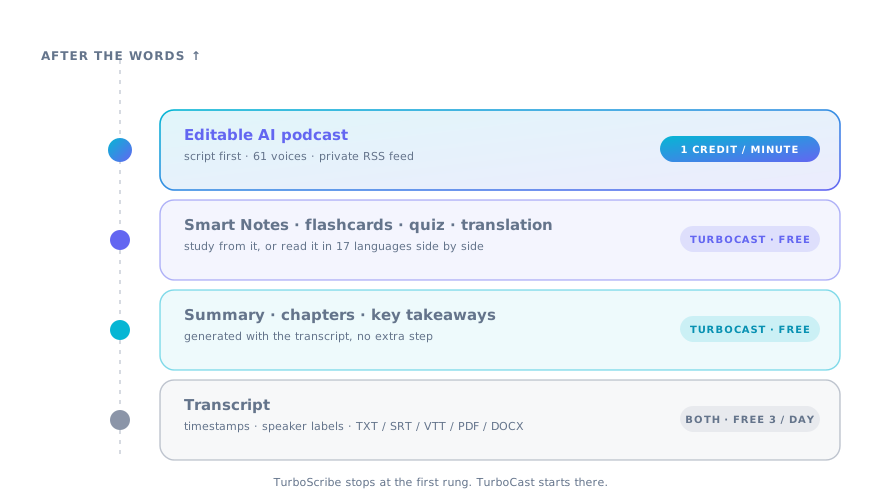
TurboCast is the TurboScribe alternative built around the second half of the job. The free tier is deliberately the same shape, three files a day up to 30 minutes, so nothing is lost on day one. What is added: an AI summary, chapter list and key takeaways on every transcript at no cost, Smart Notes and flashcards from the same file, translation into 17 languages side by side, and an editable AI podcast delivered to a private feed. Where TurboScribe is still the better buy, the page says so.
Start From the Same Free Tier
Most TurboScribe alternative pages pretend the free tier is a trick. It is not; it is generous, and this TurboScribe alternative matched it rather than undercutting it with a one-off trial.
3 files a day, 30 minutes each
The same daily allowance, renewed every day, on a free account. Files up to 100MB in any common audio or video format.
Summary and chapters included
Every free transcript arrives with an AI summary, a chapter list and key takeaways. On TurboScribe this layer is a separate AI feature; here it is part of the transcript.
The same exports
TXT, SRT, VTT, PDF and DOCX, with or without timestamps, plus copy to clipboard. Nothing you export today stops working.
What Happens After the Transcript
This is the whole argument for switching to a TurboScribe alternative. The words are the raw material; these are the things people actually needed them for.
Chapters you can click
A 90-minute recording gets a table of contents. Click a chapter and the player jumps there; export the chapters as part of the PDF.
Smart Notes
Structured study notes with key concepts pulled out, generated from the transcript in one click. Students use this instead of pasting into a chat window.
Flashcards and a quiz
Spaced-repetition cards and a short quiz from any transcript. Lecture on Monday, cards by Monday evening, without retyping.
Translation side by side
Translate the transcript into 17 languages and read it next to the original with timestamps kept. TurboScribe translates too; the side-by-side view is the difference.
Why People Look for a TurboScribe Alternative
Transcription accuracy is rarely the reason anyone searches for a TurboScribe alternative. These four are.
Cancellation and renewal surprises
The most common one-star theme in public reviews is being charged after trying to cancel, or a yearly renewal nobody remembered agreeing to. TurboCast cancels from Settings, Billing, and does not renew after you do.
Everything else lives in another tab
Summaries, notes, flashcards and audio versions all need a second tool. Consolidating them is the usual reason people move.
No way to listen back
TurboScribe turns audio into text. TurboCast also turns text back into audio you would actually listen to: an AI podcast with an editable script, not a robotic read-aloud.
YouTube links, not just files
Paste a YouTube URL and the captions are pulled and cleaned in seconds, or the audio is transcribed on paid plans when there are none. No downloading the video first.
The Part No Transcriber Has: an Editable AI Podcast
Long recordings are too long to re-listen and too dense to skim, and no TurboScribe alternative built on transcription alone solves that. TurboCast turns the transcript into a shorter narrated explanation, and lets you fix the script before a second of audio exists.
Read the script, then fix it
Turn on script review and the AI writes the episode, then stops. Cut, rewrite or regenerate one line at a time.
61 voices, or your own
Solo narration, a two-host dialogue or a debate. Preview every voice; clone yours from a short recording.
Delivered to a private feed
Episodes appear in Apple Podcasts, Spotify or any podcast app through one private RSS URL.
What Goes In, What Comes Out
One upload, four outputs. That is what makes this TurboScribe alternative a consolidation rather than a swap.
In
Audio and video files, browser recordings, YouTube links, PDFs, Word documents, article URLs and pasted text.
Transcript
Timestamps, speaker labels, five export formats. Free, three a day.
Notes
Summary, chapters, key takeaways, then Smart Notes, flashcards and a quiz. Free.
Audio
An editable AI podcast in your chosen voices. The only thing that uses credits, at 1 per minute.
TurboCast vs TurboScribe, Feature by Feature
Checked in September 2026 against TurboScribe's public pages and pricing, so you can judge this TurboScribe alternative on facts. Verify anything that matters before switching; both products change.
| Feature | TurboScribe | TurboCast |
|---|---|---|
| Free tier | 3 files a day, up to 30 min | 3 files a day, up to 30 min |
| Paid entry | Unlimited, about $10/mo yearly or $20 monthly | Starter $15/mo: unlimited transcripts, longer files, 300 podcast minutes |
| Unlimited transcription | Yes, on Unlimited | Yes, on every paid plan |
| Max file length | Up to 10 hours on Unlimited | Up to 210 minutes on Pro |
| Transcription engine | Whisper large-v3, three speed modes | Gemini 2.5 Flash, one mode |
| AI summary, chapters, key points | Separate AI feature | Included with every transcript, free |
| Smart Notes, flashcards, quiz | Yes, free | |
| YouTube link input | No, files only | |
| Translation | Yes, 100+ languages | Yes, 17 languages, side by side with original |
| Editable AI podcast + RSS feed | ||
| Export formats | TXT, DOCX, PDF, SRT, VTT and more | TXT, DOCX, PDF, SRT, VTT |
| Cancel | Account settings; reviews report friction | Settings, Billing; no renewal after cancelling |
When You Should Stay With TurboScribe
Three cases where TurboScribe is the right tool and a TurboScribe alternative would be a downgrade.
You transcribe very long recordings. TurboScribe's Unlimited plan takes files up to 10 hours. TurboCast tops out at 210 minutes on Pro and above, which covers lectures and podcasts but not an all-day deposition.
You want the cheapest unlimited transcription and nothing else. About $10 a month on the yearly plan for unlimited minutes is less than TurboCast's Starter plan, and if you never use the notes or the podcast you would be paying for features you skip.
You need the widest export list or fine control over the engine. TurboScribe exposes three Whisper modes and a long list of export formats. TurboCast picks one model and five formats for you.
Moving Over From TurboScribe
Switching to a TurboScribe alternative is short. Nothing to migrate. Export what you want to keep from TurboScribe as TXT or DOCX; here you start from the recordings themselves.
Upload the same file
Drop the recording into the audio to text converter, or paste the YouTube link instead of downloading the video. A free account takes under a minute.
Get the transcript, plus the layer on top
The words come back with timestamps and speaker labels, and the summary, chapters and takeaways are already there. Export in the format you used before.
Keep going when it is worth it
Turn the lecture into flashcards, translate the interview, or generate a podcast episode and edit its script. Only the podcast step uses credits.
The Bottom Line
If transcription is the whole job, TurboScribe is cheaper for unlimited minutes and handles longer files. Stay.
If the transcript is where the work starts, if you summarize it, study from it, translate it or want to listen to it later, TurboCast is the TurboScribe alternative that does those steps in the same place, starting from an identical free tier and a plan you can cancel without a fight.
TurboScribe Alternative FAQ
Questions people ask while weighing a TurboScribe alternative.
Where to Start
Pick the file type you were uploading to TurboScribe and judge the TurboScribe alternative on that one job.
MP3, WAV, M4A, FLAC and OGG, with summary and chapters included.
MP4, MOV and other video files, transcribed from the audio track.
The input TurboScribe doesn't take: a link.
Turn any transcript into a narrated episode.
Comparing against NoteGPT instead? Start here.
Same Free Tier. More Comes Back.
Upload the recording you would have sent to TurboScribe and see what this TurboScribe alternative returns with the transcript.