Morning Brief Intro
News podcast intro
Describe a sound or paste your lyrics. Get two finished tracks with vocals or instrumental, ready for your show, your video or just for you.
4 credits · 2 songs
Try one of these
Morning Brief Intro
News podcast intro
Golden Hour Drive
Vlog background
Garage Lights
Sports and workouts
Slow Sunday
Late-night mood
TurboCast's AI music generator turns a short description or your own lyrics into two complete tracks, with vocals or instrumental, ready to download as MP3. It sits next to the podcast, voice and video tools you already use, so the music for a project is made in the same place as the rest of it.
per generation, so you always have a second take to choose from
track length you can set in Custom mode, or leave on Auto
per generation, refunded automatically if it fails
Every track below came out of the AI music generator. They are grouped by the job they do, because a bed under a voice and a song you sing along to are written very differently.
No vocals: two takes of one podcast intro, a vlog bed and a focus loop.
News podcast intro
Ticking percussion and a brass sting, cut to 30 seconds. Take 1 of 2.
News podcast intro
The second take from the same request. Play both and keep the one that fits your show.
Vlog background
One minute of warm acoustic guitar and light percussion. Bright enough for travel footage, quiet enough to talk over.
Focus loop
Lo-fi piano chords over lazy swung drums. Nothing jumps out, which is the point for study streams.
Full songs with verses and a chorus. The last two share the same lyrics in two different styles.
Upbeat theme
Strummed steel-string guitar and handclaps. The kind of hook that works as a channel theme.
High-energy opener
Progressive house at 126 BPM with a big build. Good for a recap reel or an event promo.
Sports and workouts
Fast alternative rock with crunchy guitars and live drums.
Late-night mood
A smooth R&B slow jam with Rhodes piano and finger snaps.
Storytelling ballad
A close, quiet indie ballad for the emotional end of an episode.
Hip hop cut
Boom bap at 90 BPM with a dusty piano loop and scratches.
Indie pop version
Bright guitars and a bouncy groove carry the lyrics as a summer single.
Folk version
The same lyrics, slowed to 76 BPM with fingerpicked guitar and cello.
Sample tracks are shown exactly as the AI music generator made them, with no editing or mastering.
Most tracks from the AI music generator are done in about two minutes. You can listen to the first one before the second is finished.
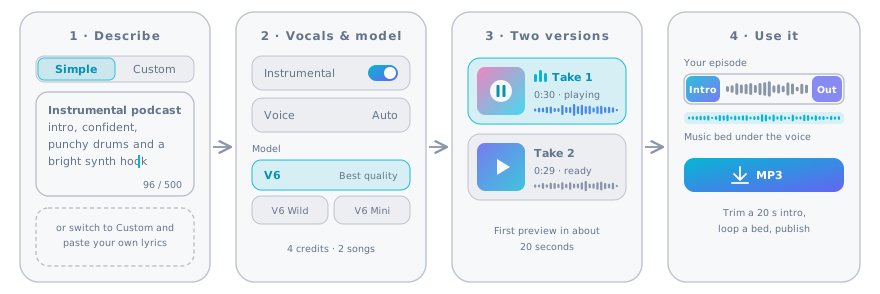
In Simple mode, tell the AI music generator in one or two sentences: genre, mood, instruments and what the track is for. In Custom mode, add a title, your own lyrics and a style.
Say what the music is for. "Under a calm voice" or "for a 20-second intro" changes the result more than another adjective.
Flip the Instrumental switch for beds and loops. V6 gives the best quality, V6 Wild takes more creative risks and V6 Mini is the fastest.
Try V6 Wild when V6 keeps landing on the obvious arrangement.
Each generation makes two different takes. The first is playable in about 20 seconds. Keep the one you like and download it as MP3.
Both takes stay in My songs, so you can come back and compare them later.
Drop the MP3 into your editor. Cut a long take down to a 20-second intro, or loop a bed under a whole segment.
Reuse the same style words for the outro and the stings, so every piece sounds like the same show.
A podcast or channel needs more than one track. These are the pieces most shows end up using, with a starting prompt for each. Use the AI music generator once per piece and keep the same style words so they sound like one family.
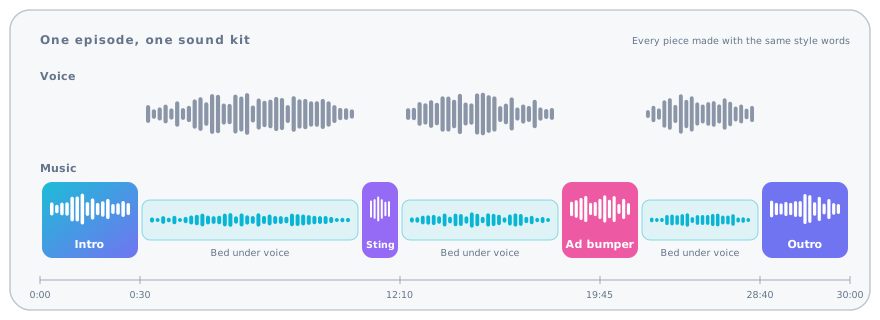
| Piece | Length to aim for | Vocals | Start your prompt with |
|---|---|---|---|
| Theme intro | 15–30 seconds | Usually none | "Instrumental podcast intro theme, confident, a clear hook in the first bars…" |
| Outro | 20–40 seconds | None or a short tag | "The same theme, slower, ending on a long final chord…" |
| Segment transition | 3–8 seconds | None | "Short musical sting, two bars, rising, clean ending…" |
| Bed under a voice | As long as the segment | None | "Calm instrumental bed, sparse piano and soft pads, no drums…" |
| Ad-break bumper | 5–10 seconds | Optional jingle | "Cheerful short jingle with a whistled hook…" |
| YouTube background | 2–4 minutes | None | "Upbeat background music for a vlog, no vocals, steady groove…" |
Background music fails when it competes with the person talking. These settings keep a track from the AI music generator out of the way.
A singing voice under a speaking voice is the fastest way to lose a listener. Beds should have no vocals at all.
Words like "sparse", "soft pads" and "gentle piano" leave room in the middle of the mix, where speech sits.
In Custom mode, put what you don't want in Exclude styles: "vocals, heavy drums, distorted guitar".
Bring the music well below the voice and dip it further while someone talks (ducking). Most editors and DAWs do this automatically.
Simple mode is the quickest way to try an idea. Custom mode gives you every control the AI music generator has.
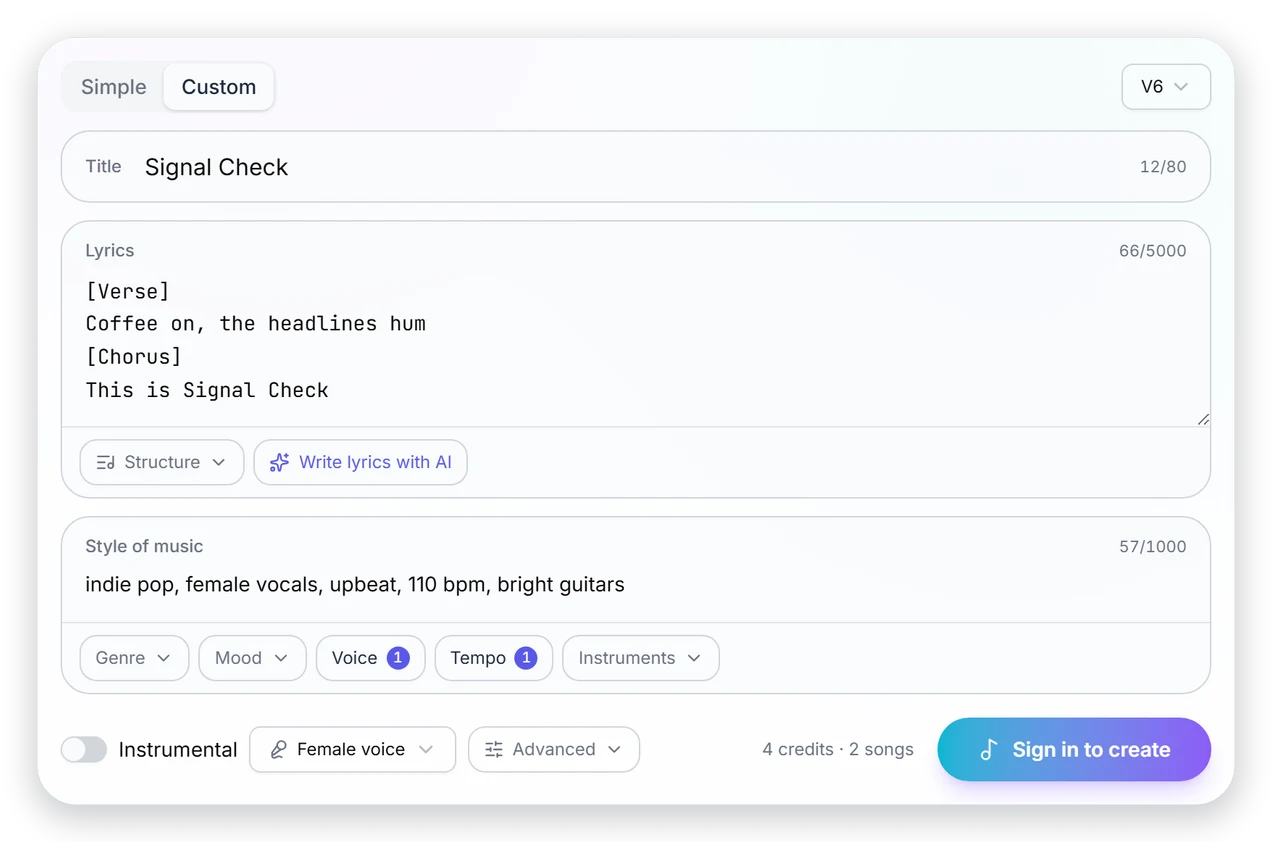
| Simple mode | Custom mode | |
|---|---|---|
| You write | A description of up to 500 characters | A title, lyrics (up to 5,000 characters) and a style |
| Lyrics | Written for you from the description | Yours, or two drafts from the AI lyrics writer |
| Song structure | Chosen by the model | Your tags: [Verse], [Chorus], [Bridge], [Outro] |
| Style tags | In the description | Pick from genre, mood, voice, tempo and instruments |
| Exclude styles | ||
| Voice | Chosen by the model | Auto, male or female |
| Track length | Auto | Auto, or 10 seconds to 6 minutes |
| Style weight and weirdness | ||
| Best for | Quick ideas and background music | Your own lyrics and repeatable results |
Each prompt below is written for a specific job. Click Use this prompt to load it into the AI music generator above, then change the details to fit your show.
Instrumental news podcast intro, ticking percussion, deep pulsing bass and a bold brass sting, serious and urgent, clear ending
Cut the first 15–20 seconds and fade the rest. The sting gives you a natural cut point.
Calm instrumental background bed for an interview podcast, sparse electric piano and soft pads, no drums, no lead melody, steady and warm
Loop it under the whole conversation at a low level. Run the AI music generator twice and keep the calmer take.
Bouncy ska-pop theme song with horns and a shout-along chorus about two friends who can't stop arguing
Use Custom mode and write the chorus yourself if you want the show's name in it.
Slow ambient soundscape with warm pads, distant chimes and soft rain, no beat, very calm, for a guided meditation
Set the length to match your session in Custom mode, so you don't have to loop it.
Bright modern background music for a product demo video, light plucked synths, clean drums, optimistic, no vocals
Ask for a steady groove so you can cut it to the length of each scene.
Catchy pop song with a simple chorus that lists the eight planets in order from the sun
Short, rhythmic lists stick best. Keep one fact per line of the chorus.
A melody is one of the oldest ways to remember things. Turn a list, a formula or a vocabulary set into a song with the AI music generator and replay it on the way to class.
A single list or concept fits in a chorus. The Krebs cycle fits. A whole chapter does not.
In Custom mode, open Write lyrics with AI and describe the topic. You get two drafts for 1 credit; edit the facts so they are exactly right.
Put the key facts in a [Chorus] tag so they come back three or four times. Pick an upbeat style so it gets stuck in your head.
Tracks from the AI music generator, your narration and your episodes all come from one account and one set of credits.
Turn an article, PDF or YouTube video into a narrated episode, then add the theme you made here.
Read a script aloud in natural voices and lay it over a music bed.
Clone your voice once and use it for intros, ads and sign-offs.
What you can do with songs from the AI music generator, in plain language.
Every generation in the AI music generator costs 4 credits and makes 2 songs. AI lyrics cost 1 credit for two drafts. If a generation fails, the credits go straight back. Here is what each plan's monthly credits buy if you spend them all on music.
| Plan | Credits per month | Generations | Songs |
|---|---|---|---|
| Starter | 300 | 75 | 150 |
| Basic | 600 | 150 | 300 |
| Pro | 1,200 | 300 | 600 |
| Team | 1,800 | 450 | 900 |
| Enterprise | 2,200 | 550 | 1,100 |
Answers about cost, rights, length and lyrics.
Describe the sound, pick vocals or instrumental and get two versions in about two minutes with the AI music generator. Included in every paid plan.