
A Notta Alternative Built for Recordings, Not Meetings
Notta is a meeting assistant that also transcribes files: a bot joins your Zoom call, and the free plan caps every recording at three minutes. If your audio is already a file, a link or a lecture, TurboCast is the Notta alternative that starts from there, with 30-minute free transcripts every day and summaries that are never rationed.
The Short Answer
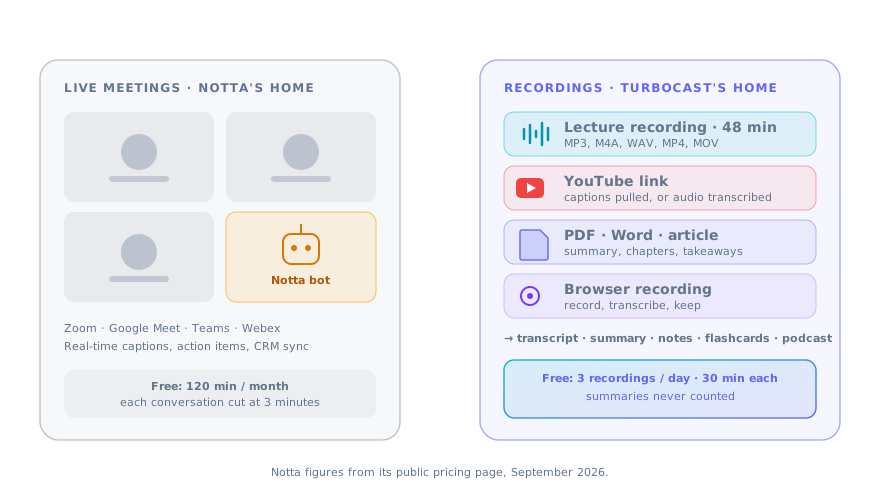
Notta's centre of gravity is the live meeting. Its bot records Zoom, Google Meet, Teams and Webex, transcribes in real time, and files the result in a workspace with summaries, action items and CRM integrations. Uploaded files are supported, but they are a side entrance.
That shows in the free plan. You get 120 minutes a month, but each conversation is cut at three minutes, AI summaries are capped at 10 a month, and if you downgrade later only the first three minutes of your old transcripts stay readable. Fine for trying the bot; useless for a 45-minute lecture.
TurboCast is the Notta alternative for the other kind of user: the one holding a recording, a PDF or a YouTube link. Free transcripts are 30 minutes long, three a day, every day, and every one arrives with an AI summary, chapters and key takeaways that are never counted. From there the same file becomes Smart Notes, flashcards, a translation or an editable AI podcast. What TurboCast does not do is join your meeting, and the page says plainly when that means Notta is the right choice.
Three Minutes Is Not a Transcript
The single number that sends people to a Notta alternative, so this Notta alternative page starts with it. 120 free minutes a month sounds generous until each file stops at minute three.
30 minutes per file, free
A full lecture segment, a podcast episode or a client call in one piece. Three of them a day, renewed daily, on a free account with no card.
Summaries are not rationed
Notta counts AI summaries: 10 a month free, 100 on Pro. TurboCast generates a summary, chapters and key takeaways with every transcript and never counts them.
Your transcripts stay readable
Downgrade from a paid plan and your old transcripts remain fully visible. Notta hides everything past minute three once you drop to Free.
Why People Look for a Notta Alternative
Notta users who look for a Notta alternative tend not to be unhappy with the meetings feature. They never needed it.
Paying for a bot you don't use
Pro is priced around meeting capture, CRM sync and team workspaces. If you transcribe recordings alone, most of what you pay for sits idle.
A monthly minute meter
1,800 minutes a month on Pro is plenty until a conference week, and then it is gone. TurboCast's paid plans do not meter transcription at all.
YouTube is a workaround
Notta's online tool emails you a transcript link that expires in 72 hours. TurboCast opens the YouTube transcript in the app with chapters and keeps it.
Nothing for studying or listening
Notta summarizes for meetings: decisions and action items. It does not make flashcards, quizzes or an audio version. Students and researchers hit that wall fast.
What This Notta Alternative Includes on the Free Plan
All of it on a free account, three files a day, none of it counted against a monthly balance.
Audio and video transcription
MP3, WAV, M4A, MP4, MOV and browser recordings up to 30 minutes and 100MB, with timestamps and speaker labels. Export as TXT, SRT, VTT, PDF or DOCX.
YouTube and article links
Paste a URL. Captions are pulled and cleaned in seconds; article text is extracted and summarized. No email link, no expiry.
PDF and Word documents
Lecture slides, papers and reports get the same summary, chapters and takeaways as a recording, and can go on to become notes or a podcast.
Smart Notes, flashcards, quizzes
Structured study notes from any transcript, then spaced-repetition cards and a quiz. The part Notta does not attempt.
Listen to the Recording Instead of Rereading It
Notta turns speech into text and stops; a Notta alternative worth switching to should do more with it. TurboCast can also turn the text back into a shorter narrated explanation you would actually put in your ears, and lets you edit the script first.
Script review before audio
The AI writes the episode and pauses. Change a line, drop a tangent, regenerate one sentence, then generate the audio.
61 voices and three formats
Solo narration, two-host dialogue or a debate, in a voice you previewed or one you cloned from a short sample.
A feed, not a file
Episodes reach Apple Podcasts, Spotify or any podcast app through a private RSS URL. This is the only TurboCast feature that uses credits, at 1 per minute of audio.
One Upload, Four Results
Why consolidating on a Notta alternative is more than swapping transcribers.
Seven inputs
Audio, video, browser recording, YouTube link, article URL, PDF, Word document, pasted text.
Transcript
Timestamps, speaker labels, five export formats, translation into 17 languages side by side.
Notes
Summary, chapters, key takeaways, Smart Notes, flashcards, quiz. All free.
Audio
An editable AI podcast in your chosen voices, delivered to a private feed.
TurboCast vs Notta, Feature by Feature
Checked in September 2026 against Notta's public pricing page, so you can judge this Notta alternative on facts. Both products ship changes often; verify anything that decides it for you.
| Feature | Notta | TurboCast |
|---|---|---|
| Free plan | 120 min/month, 3 min per conversation, 50 uploads, 10 AI summaries | 3 files a day, 30 min each, summaries uncounted |
| Paid entry | Pro $8.17/mo yearly, $13.99 monthly, 1,800 min/month | Starter $15/mo, unlimited transcripts, 300 podcast minutes |
| Unlimited transcription | Business, $16.67/mo yearly | Every paid plan |
| Max recording length | 5 hours on Pro and Business | 210 minutes on Pro and above |
| Live meeting bot (Zoom, Meet, Teams, Webex) | ||
| Real-time transcription | No, files and links only | |
| YouTube link input | Web tool, transcript emailed, link expires in 72 h | In app, with chapters, kept |
| AI summary | Metered: 10 / 100 / 200 per month | Every transcript, uncounted |
| Flashcards, quizzes, Smart Notes | Yes, free | |
| Editable AI podcast + RSS feed | ||
| Languages | 58 transcription, 42 translation | 100+ detected, 17 translation targets |
| Integrations | Notion, Slack, Salesforce, Zapier | Private RSS, exports |
| Transcripts after downgrade | Only first 3 min visible | Fully readable |
When You Should Stay With Notta
Any Notta alternative page owes you the cases where the answer is no.
You live in meetings. If most of what you transcribe is a call happening right now on Zoom, Meet or Teams, Notta's bot, real-time captions and action-item summaries are the product. TurboCast has no bot and no live mode; you would be recording locally and uploading afterwards.
Your team needs the workspace. Shared folders, Notion and Slack sync, Salesforce and Zapier hooks, SSO on Enterprise. TurboCast is a personal tool with a private podcast feed, not a team system of record.
You record very long sessions. Notta accepts five-hour recordings on paid plans; TurboCast stops at 210 minutes. A full-day workshop is a Notta job.
Moving Over From Notta
Moving to a Notta alternative takes three steps. Export what you want to keep from Notta first, especially if you are on Free and only three minutes of each transcript are still visible. Then start here from the recordings.
Upload the recording or paste the link
The audio file, the YouTube URL or the PDF goes into the tool page that matches it. A free account takes under a minute; no card.
Read the transcript and the notes together
Timestamps, speaker labels, summary, chapters and takeaways arrive at once. Export in the format your old workflow expected.
Go further when the material deserves it
Flashcards for the exam, a translation for a colleague, or a podcast episode with a script you approved. Only the podcast step uses credits.
The Bottom Line
Notta is a meeting product with a transcription tool attached. If meetings are your problem, stay.
If recordings are your problem, lectures, interviews, podcasts, YouTube videos, documents, TurboCast is the Notta alternative that treats them as the main event: 30-minute free transcripts every day, summaries that are never counted, study material on demand and an editable podcast when you would rather listen.
Notta Alternative FAQ
What people ask when they weigh a Notta alternative.
Where to Start
Pick the kind of recording you were uploading to Notta and judge the Notta alternative on that one job.
Recorded calls, interviews and voice memos, 30 minutes free.
The link input Notta only offers by email.
Recording to structured notes in one step.
Turn the recording into something you can listen to.
Comparing against a pure transcriber instead? Start here.
Transcribe the Whole Recording, Not Three Minutes of It
Upload the file you would have sent to Notta and see what this Notta alternative returns: the full transcript, summary and chapters, free.